New Options for Sophia Icon Positioning
Sophia
What's new?
Sophia users now have more flexibility over where the chat icon appears in Bullhorn. Previously, you could only choose to show or hide the icon, and its position was fixed. With this update, the icon is always available, but you can now choose from multiple on-screen locations to place it wherever works best for your workflow.
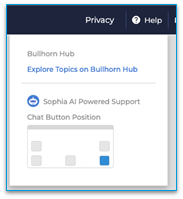
To adjust the icon position, click Help at the top of Bullhorn and select your preferred placement from the dropdown. Your choice is saved to your user account, giving you full control over where the icon appears.
Check out Using Sophia to Get Support in Bullhorn ATS/CRM for further details.
Why does it matter?
This update keeps the Sophia chat icon easily accessible whenever you need it while giving you far more control over how it fits into your workspace. You can move the icon out of the way of your usual workflows, keep your screen layout tidy, and still have fast access to Sophia's assistance without interruption.Sophia AI Support Chat is currently available only to select customers as part of an early access program. Organizations will receive a communication when Sophia is ready to be enabled.